
This is part 4 of five on how my CMS works. Parts 1 to 3 covered the architecture, publishing and security.
Two of the four sites came from WordPress: my own blog, a few hundred posts going back to 2008, and my wife Aarti's site, with over 2,400. The rule for both was the same as for every live post in the CMS: an address never changes. Anything anyone ever linked to has to keep working.
Reading WordPress from the outside
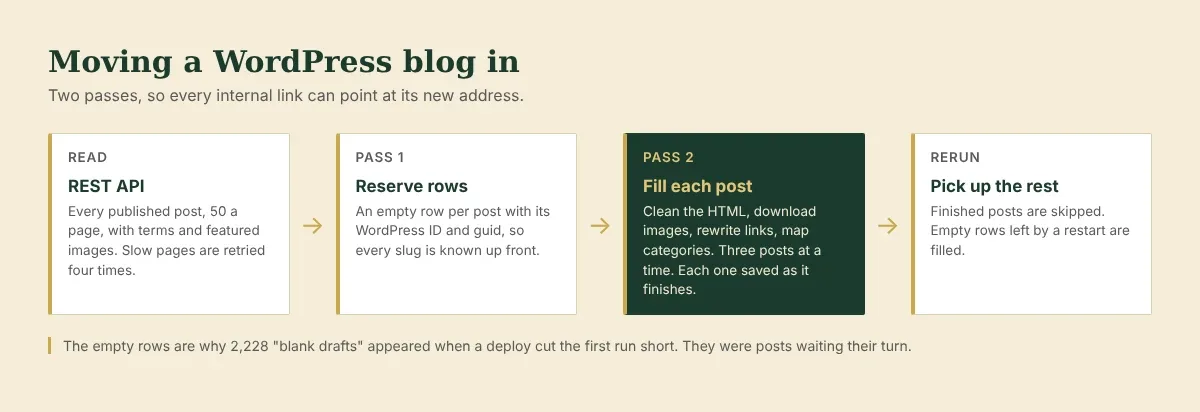
The import does not touch the WordPress database or install a plugin. It reads the public REST API that every WordPress site has, 50 posts a page, with each post's categories, tags and featured image included. That meant I could import from a live site without changing anything on it.
Two passes, so links can be rewritten
Old posts link to each other, using whatever address WordPress gave them at the time. Some use the dated address, some the post's ID (?p=123), some a bare slug. To rewrite a link to its new address, the import has to know every post's new address first.
So it works in two passes.
Pass 1 creates an empty row for every post, holding its WordPress ID and its original feed identifier. That second one matters: feed readers and email services use it to decide whether a post is new. Keeping it exactly means subscribers are not sent a decade of old posts on the day the blog moves.
Pass 2 fills each row:
The post HTML is cleaned. WordPress block wrappers, classes and inline styles are dropped. The structure stays.
Every image is downloaded, re-encoded and stored in the CMS's own library. Old posts often load images from hosts that no longer answer. Each download gets 20 seconds, and a failure is reported without stopping the post.
Every internal link is rewritten to the new address. Links the import cannot match are listed for me to look at, never guessed.
The slug and date are kept exactly as WordPress had them, because together they make the address.
The post is published as it was.
What an old archive is full of
Old WordPress archives carry a lot of baggage.
Page builder shortcodes. Some old posts were built with the Divi page builder. Through the API, they arrive as text full of [et_pb_section][et_pb_row][et_pb_text]. The words are inside, and the images, videos and buttons are buried in the shortcodes' settings, with curly quotes WordPress added to the attributes. A clean-up step turns all of that back into plain HTML.
Dead links and dead images. A second clean-up runs across every post. Images still loading from another host are copied in, or removed and marked if the host is gone. External links that answer "not found", or whose site no longer exists, are unlinked and marked "[now dead link]". Sites that only block robots are left alone, since those pages may still exist.
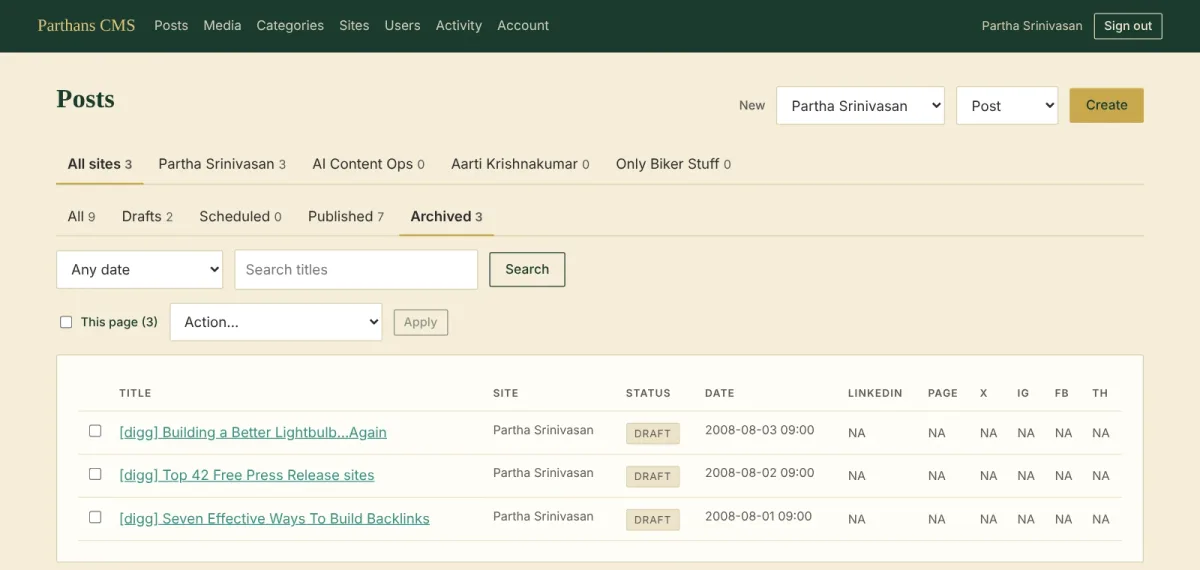
Posts that were never really posts. My blog still had a run of short "[digg]" link posts from 2008, sitting as drafts. Nobody needs them again. This week I added an Archived section to the CMS: anything that is not a real draft goes there, out of the Drafts list and the counts. It can never be published until it is restored, and it can be deleted for good in one go.
Redirects, so old links keep working
My old blog lived at blog.parthans.com. It now lives at parthans.com/blog. A handful of Nginx rules on the server send every old address to its new home: dated posts, category and tag pages, the feed, and the ?p=123 links. For Aarti's site, where the old addresses do not follow one pattern, the CMS writes out the full list of old and new addresses, one per line, ready for Nginx.
Mapping categories, with a person in the loop
Aarti's new site is split into two halves, Work and Tales, with a small set of categories on each side. Her WordPress categories did not line up with them one to one. A "Reviews" category, for example, held book reviews, restaurant reviews and film reviews.
So a person decides. The import first proposes a mapping: each WordPress category, how many posts it holds, and where it would go. A review becomes a subcategory under whatever the post's other categories make it, so a book review lands in Books and a restaurant review in Food. I checked every line, changed what was wrong, and approved it. Only then does the import run.
The evening of 2,228 blank drafts
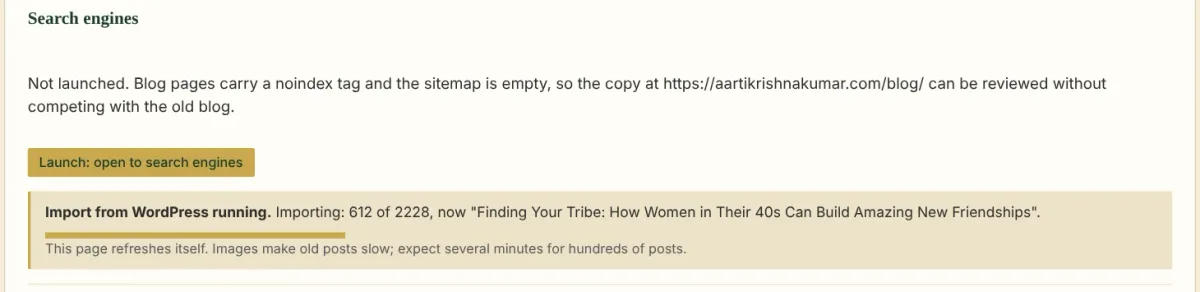
My own blog was a few hundred posts. Aarti's was ten times that, and her import kept stopping partway. One evening the Posts page showed 247 published posts and 2,228 drafts. The first three pages of drafts were completely blank. No title, no text.
I asked Claude why. Its first answer was that these were probably rows left over from an interrupted run, and that deleting blank drafts in bulk would be safe. That answer was wrong. I told it she had over 2,400 posts on her old site, and the numbers lined up at once: 247 plus 2,228 is her archive. The blank drafts were pass 1's empty rows, each waiting for pass 2 to fill it. Deleting them would have removed 2,228 of her posts from the CMS. A rerun could have brought them back, but only while her old site was still online, and that site moves aside when the new one launches.
Then we found why the import kept stopping:
Restarts. The import runs inside the CMS. Every deploy restarts the CMS, and that day there had been several.
No retries. Reading the post list from her old host took a long time per page. One page taking more than 60 seconds failed the whole run.
A ceiling. The import read at most 50 pages of 50 posts. That is 2,500 posts, very close to her total.
The fixes:
each page of the post list now gets four tries, with longer waits between them
the ceiling is gone
three posts are filled at a time, sharing image downloads so two posts never fetch the same image twice
every finished post is saved immediately, so a rerun skips it and fills only what is left
empty rows now say Waiting for import on the Posts page, instead of looking like abandoned drafts
The photos the cleaner dropped
When Aarti's import finished, the report listed 3,648 links from her photos to their full-size files on the old site. Those links would break once the old site was gone, so I asked Claude to copy each file into the CMS and point the link at the copy.
While building that, one of its own tests failed, and the failure turned out to be a much older bug. The CMS cleans every post's HTML when it saves and again when it builds. One step of that cleaning removes empty paragraphs. Claude wrote it on the first day, and it judged a paragraph empty when the only thing in it was a photo inside a link. That is exactly how WordPress inserts a photo set to open its full-size file when clicked.
So those photos were very likely dropped when the posts were saved, on Aarti's site and on mine. None of the 61 tests at the time had a photo inside a link, so nothing caught it. The fix keeps any paragraph that holds a picture, and a test now covers that case. As I write this, I am checking how many photos it took. Her old site is still online, so they can be brought back from there before it goes.
The lesson I keep coming back to: the AI's first explanation fitted the evidence it had. It had not asked how many posts the site really had, and I had not said. One fact from me changed the answer completely. When something looks like junk, find out what it is before deleting it.
Next, the final part: running the CMS day to day, and how I worked out what restarted it at 10:55 one night.