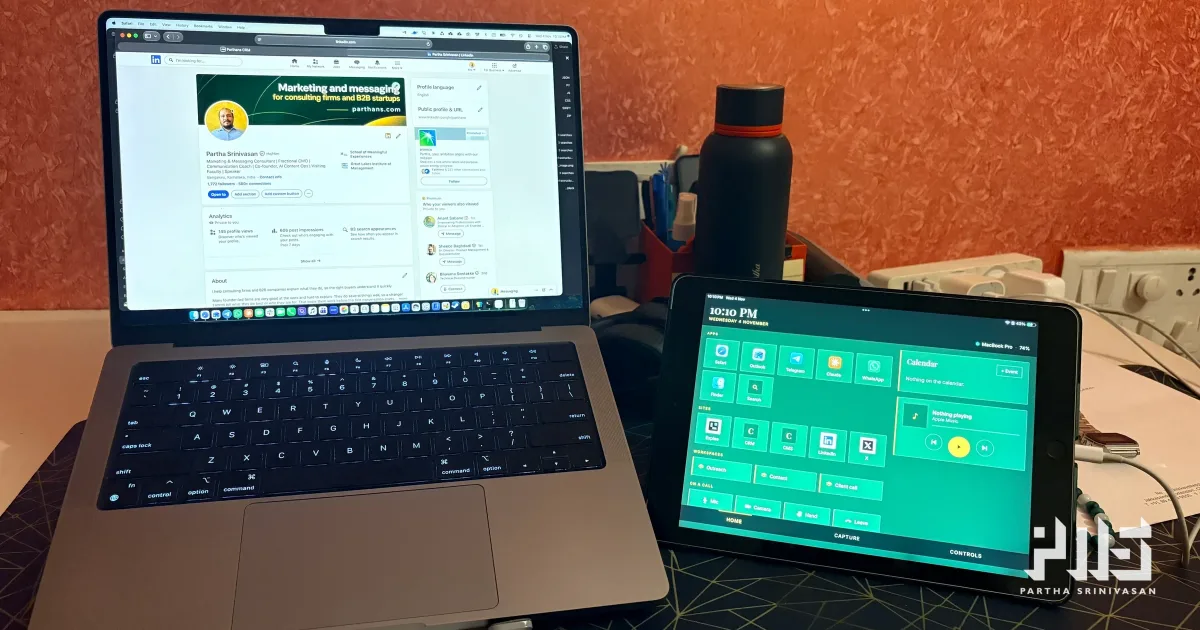
My iPad is a sixth-generation, 9.7-inch model. It still works. I had stopped using it, and a new iPad Pro is on its way, so this one was headed for a drawer.
I wanted it beside my MacBook instead, as a panel of buttons for the things I do fifty times a day: open an app, open my CRM, check what is next on my calendar, skip a song. Over Wi-Fi, so it could sit anywhere on the desk, and on my phone's hotspot when I work away from home.
I set three rules. It had to be free. It had to run in the iPad's browser, with no app to install. And I had to be able to change every button myself.
What already existed
Apple's Sidecar turns an iPad into a second screen for a Mac, and it is free. It gives you more screen, though, and I wanted buttons.
Elgato's Stream Deck Mobile is a proper button panel. It needs an app on the iPad, and the free version gives you six buttons.
WebDeck is the closest match: a button panel served to any browser. For now it only runs on Windows.
Nothing met all three rules, so I built my own and called it Deck. I built it with Claude, Anthropic's AI model. I set the requirements, made the calls and tested it. Claude wrote the code, tested it on its own machine first, and wrote the setup steps.
How it works
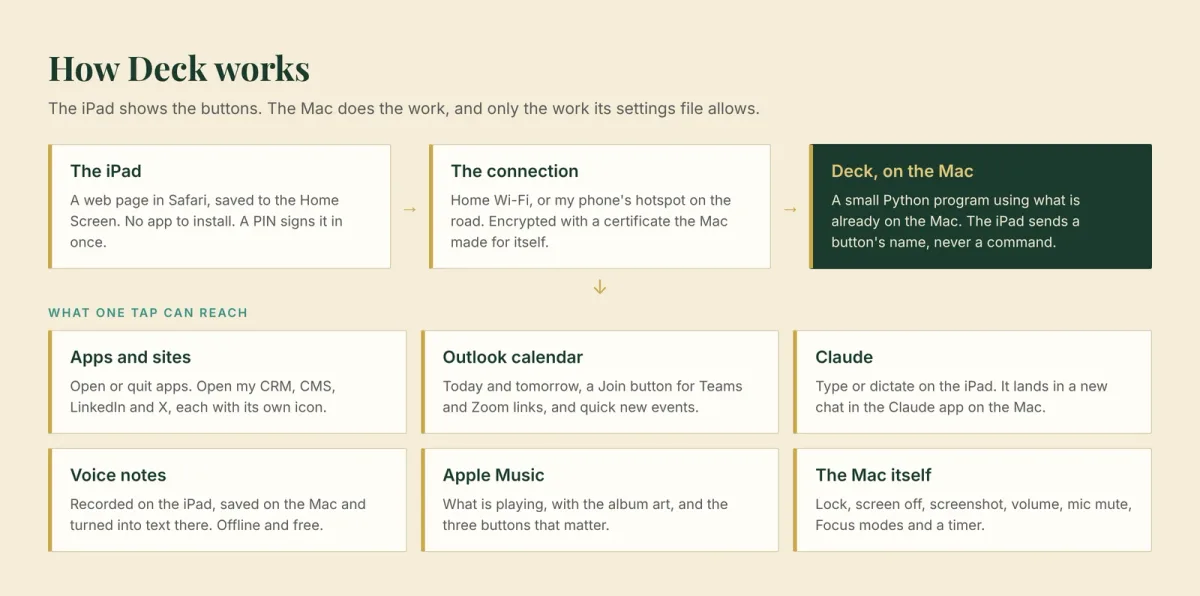
Deck is a small program on the Mac, written in Python, which macOS already has. It serves a web page to the iPad. I opened that page in Safari once and saved it to the Home Screen, so it now opens full screen like an app.
The iPad only shows buttons. When I tap one, the iPad tells the Mac which button it was, by name, and the Mac decides what that means. Every button lives in one settings file on the Mac, so the iPad cannot ask for anything I have not listed there. Changing a button means editing that file and reloading the page.
What is on it
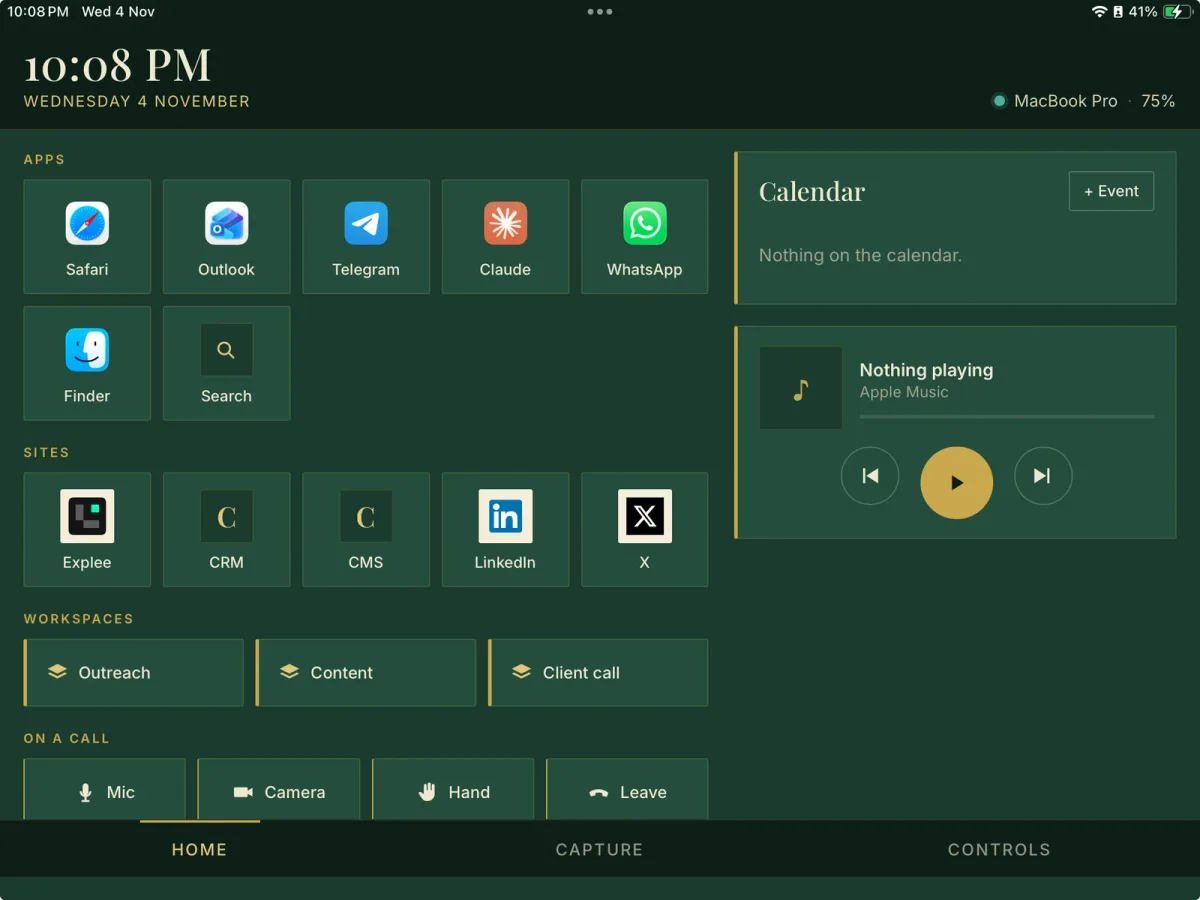
The panel has three pages.
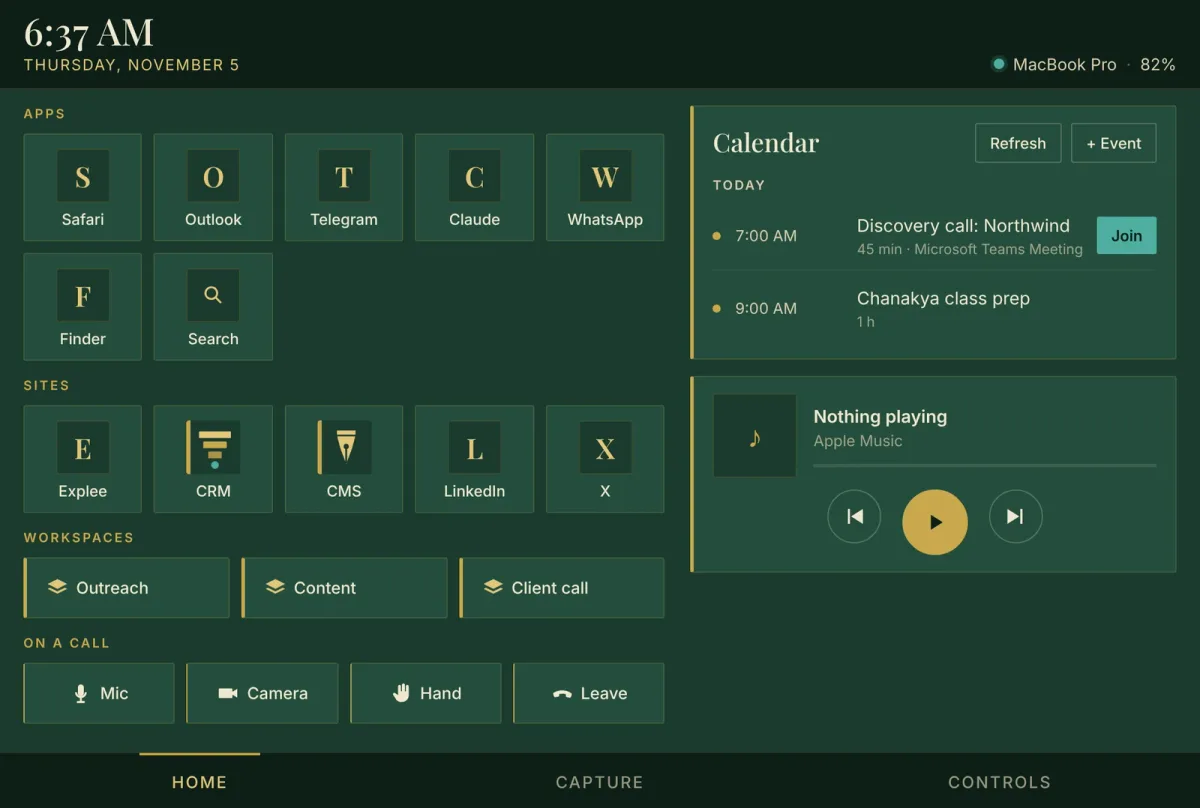
Home is the one I use most.
Apps and sites. One tap opens or brings forward Safari, Outlook, Telegram, Claude, WhatsApp or Finder. Holding a button, then tapping it again, quits that app. The site buttons open Explee (where my outreach runs), my CRM, my CMS, LinkedIn and X. If a site is already open in a tab, Deck brings that tab forward.
Workspaces. One button opens a set of apps and sites together.
On a call. Mic mute, camera, raise hand and leave, for Teams.
Calendar. Today and tomorrow from my Outlook calendar, a Join button on any meeting with a Teams or Zoom link, a Refresh button and a quick way to add an event.
Music. What Apple Music is playing, with the album art, and play, pause and skip.
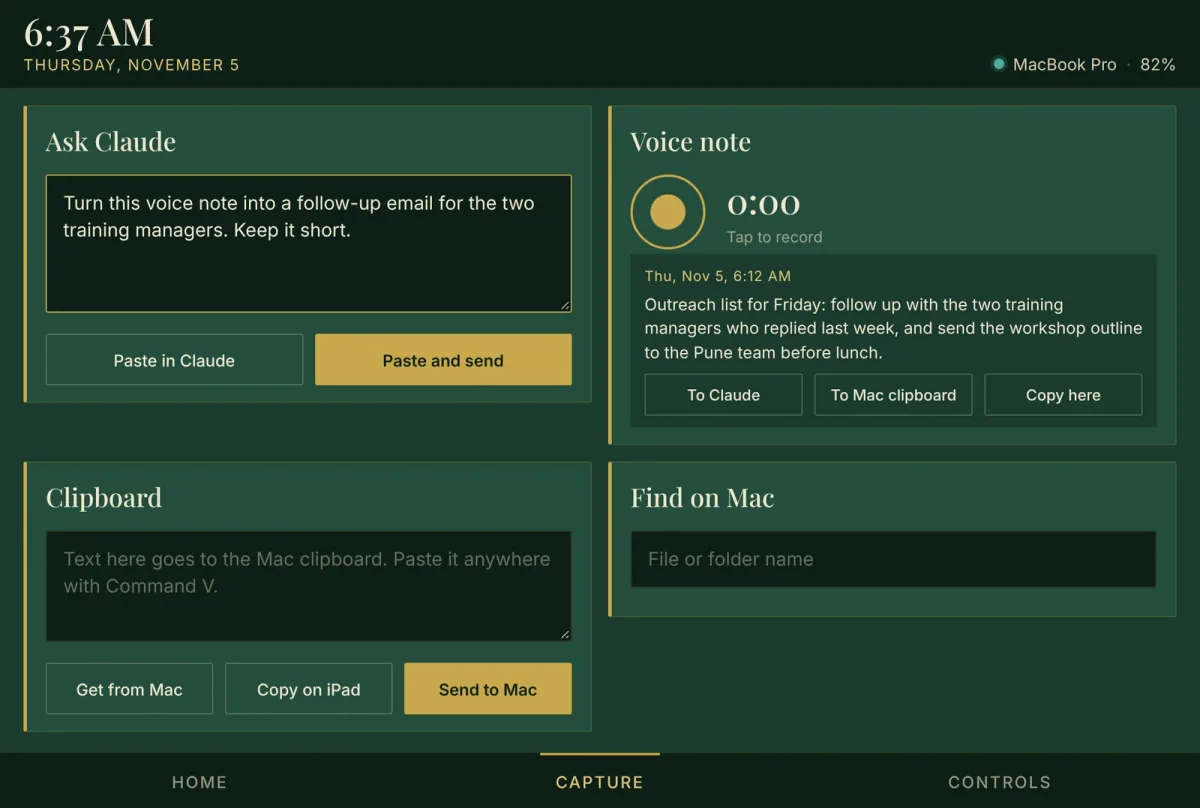
Capture is for getting things out of my head and onto the Mac.
Ask Claude. I type or dictate on the iPad, and Deck pastes it into a new chat in the Claude app on the Mac.
Voice notes. I record on the iPad. The audio is saved on the Mac, and whisper.cpp, a free speech-to-text tool, turns it into text on the Mac itself, with nothing sent anywhere. The text can go to Claude or the Mac's clipboard.
Clipboard. Text moves between the iPad and the Mac in either direction.
Find on Mac. Search by file name, then open the file or show it in Finder.
Controls has Focus modes, lock, screen off, screenshot, volume and mic buttons, and a timer.
A page that runs things on my Mac
A web page that can open apps and type into them is something to be careful with.
It asks for a PIN once, on each device, and slows down after five wrong tries. The connection is encrypted, using a certificate the Mac made for itself during setup, which the iPad was told to trust. It works on my home network or my phone's hotspot and is not reachable from the internet. And the iPad never sends a command, only the name of a button from the settings file.
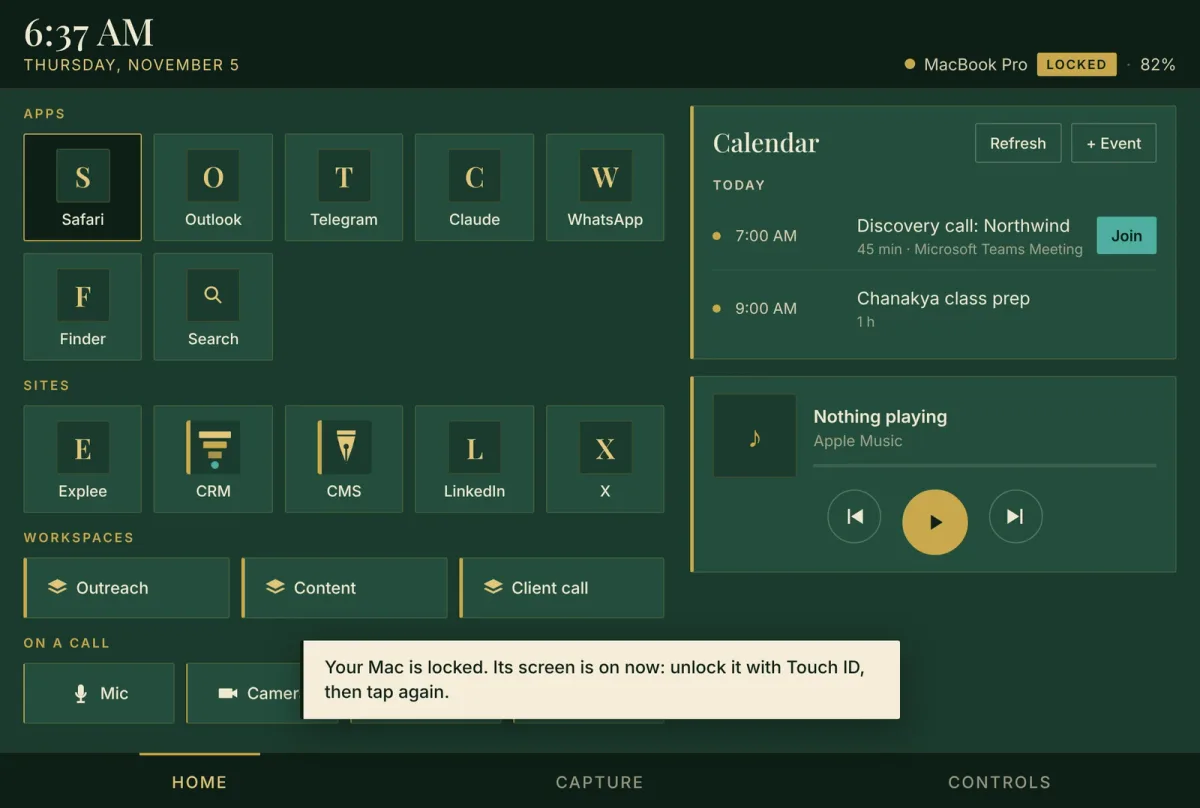
I added one more safeguard on the second morning. If the Mac is locked when I tap something, Deck does not run it. It wakes the Mac's screen and tells me to unlock it first, because a tap that types into a lock screen is a tap I do not want. Music, volume, mute and lock still work while it is locked.
The first version took minutes. Using it took the evening.
I asked whether this was possible just before noon. I listed the apps and sites at 12:03. The first version was ready about twenty minutes later. I set it up that evening, and that is when the real work started.
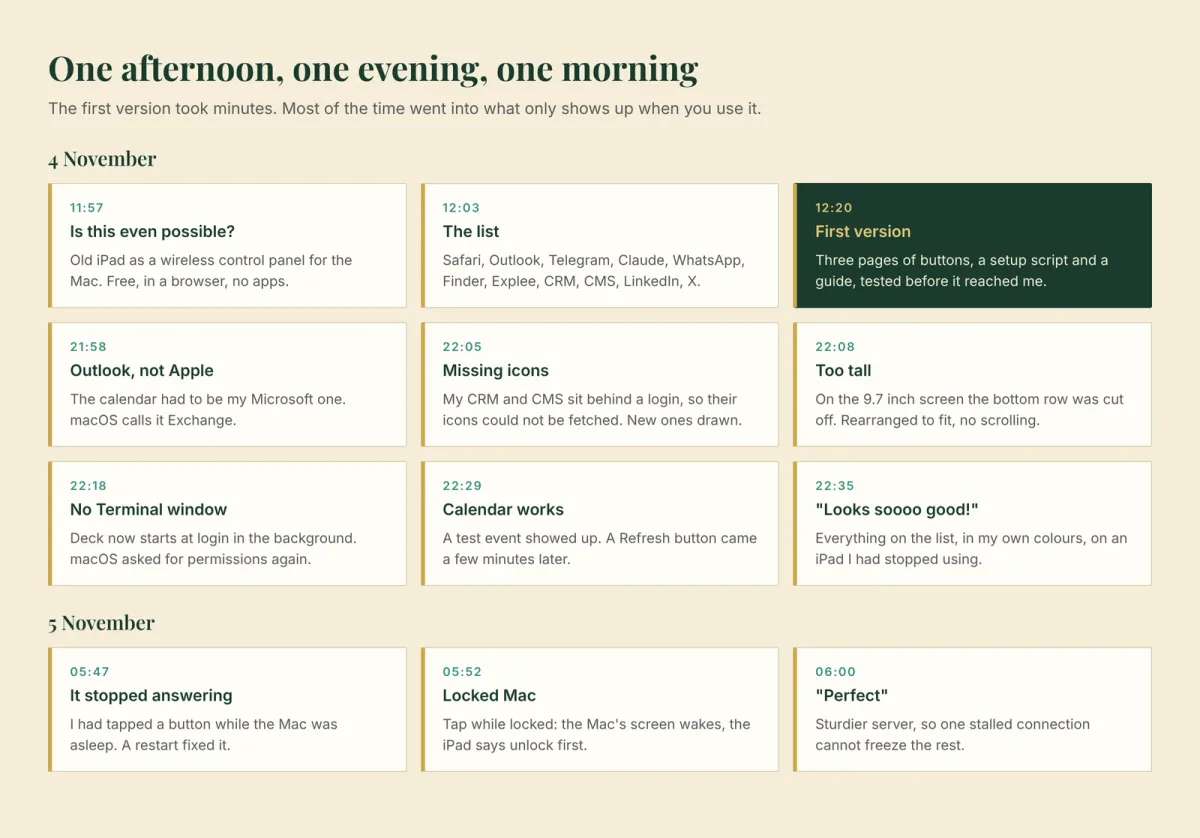
The calendar was the wrong one. The first version read Apple's calendar. My calendar is Microsoft 365 Outlook. Deck reads it through macOS, so I added my Microsoft account to the Mac. I went looking for a Microsoft 365 option and found only "Microsoft Exchange", which is the right one. Then the card still could not find my calendar. Claude changed how Deck recognises the account, I ran one command to rebuild that part, and my test event appeared. I asked for a Refresh button the same night, so I would not have to reload the whole page to see a change.
Two icons were missing. Deck fetches each site's own icon to put on its button. My CRM and CMS sit behind a login, so Deck got the login page instead of an icon. Claude drew two in my colours, a gold pen nib for the CMS and a gold funnel for the CRM. They are on the buttons, and they are now the favicons of the CRM and CMS themselves.
The page was too tall. On a 9.7-inch screen, the bottom row of buttons was cut off and the page had to scroll. The call buttons were moved and the spacing tightened, and every page now fits without scrolling.
It needed a Terminal window. Deck ran inside a Terminal window, and closing that window stopped it. Now it starts on its own when I log in, with no window. macOS treats a program started that way as a different program, so it needed my permission again to press keys and read my calendar. It also kept that program out of my Documents folder, so voice notes now save to a folder of their own.
It stopped answering after I tapped it while the Mac slept. The next morning the iPad said it could not make a secure connection. Restarting Deck fixed it. I had tapped a button while the Mac was asleep, and I suspect the iPad started a connection that the sleeping Mac never finished. I cannot prove that was the cause. Deck now drops any connection that has not finished within ten seconds, so one stuck connection cannot hold up the rest.
What it cost
Nothing. No apps, no subscription and no new hardware. Python came with the Mac, and whisper.cpp is free. The iPad was going into a drawer.
Next
The new iPad Pro arrives soon, and the layout will need a version for its larger screen. The three workspace buttons still open my first guesses at what belongs together, and they need real thought.
The screenshots of the full panel come from a test copy of Deck with invented calendar events. The screenshot of the first version, with the cut-off row, is from my own iPad.
Edit, 5 November: Deck is now on GitHub, free for anyone to use: github.com/parthans/the-deck-by-parthans. It is open source under the MIT licence. The public version has a neutral look and a generic set of buttons, and setup takes about 15 minutes on any recent Mac.