
A few weeks ago I wrote that I got tired of WordPress and built my own CMS. That post was about why. Several people asked how. This series is the answer, in five parts:
One admin, plain files out (this post)
Publishing through git
Locking down the admin
Moving thousands of posts out of WordPress
Running it: deploys, backups and a restart I had to explain
I built it with Claude, Anthropic's AI model, working in Claude Code. I wrote the requirements, made the decisions and tested everything. Claude wrote the code and the tests. Where it got things wrong, I say so.
The screenshots come from a copy of the CMS running on a test machine with sample posts. Email addresses, IP addresses and server names are blurred.
The spec came first
Before any code, I wrote a specification and signed it off. It went through five drafts. The last one, dated 6 October, is a few pages long and has a table called "Decisions settled": admin address, which sites, URL format, security, editor, users, comments, hosting, email, images, social, automation. Each row is one line.
That table did more work than anything else in the project. When you build with an AI model, the model will happily build whatever you describe, including the thing you half described. A settled decision is something it cannot drift away from, and something I can point back to when a change quietly contradicts it.
Two decisions changed after sign-off, and both changes were deliberate:
Address. The spec said every blog lives on a subdomain, blog.parthans.com. I moved the blog to parthans.com/blog instead, because Google treats a subdomain largely as a separate site. The first post explains that.
How files reach the server. The spec had the CMS writing straight into the blog folders on my server and swapping them live. I changed that to GitHub. More on why in part 2.
Changing a spec is fine. Changing it without noticing is the problem.
What it is made of
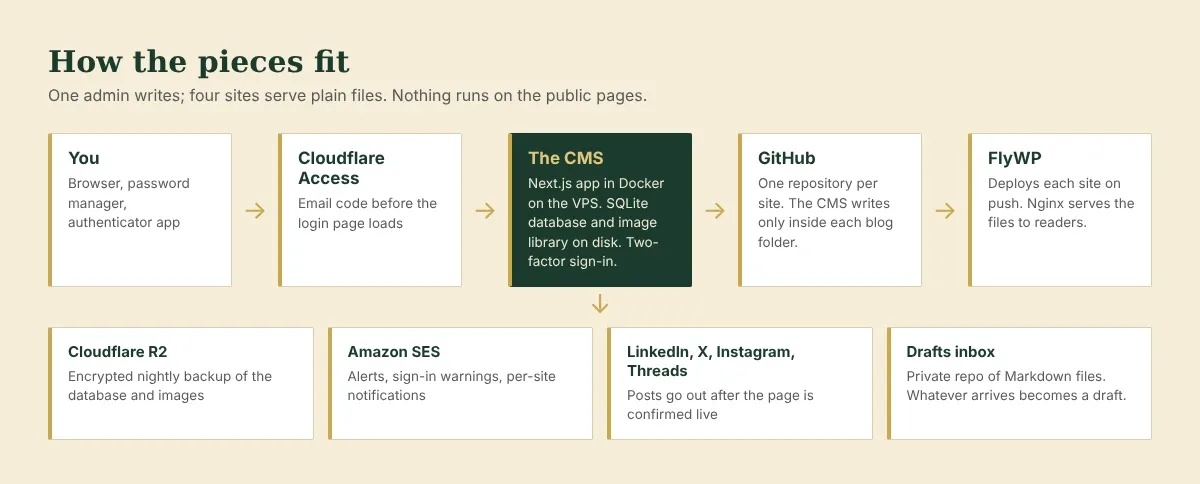
The whole thing is one small web application. It runs in a Docker container on my VPS, deployed by FlyWP, the same panel that runs my other sites.
Next.js 15 and React 19 for the admin screens and its API. Most screens are rendered on the server.
SQLite, through Node's built-in
node:sqlite. One file holds every post, user, setting and log line. No database server to run, patch or back up separately. It needs Node 22.13 or later.Tiptap for the editor. It feels like Google Docs and stores clean HTML.
sharp for images. Every upload is re-encoded and resized into WebP at the sizes the blog needs.
sanitize-html to clean post HTML to an allowed list, on save and again on build.
cheerio to read and rewrite HTML: imported WordPress posts, and each site's own header and footer.
turndown, for the one site that wants Markdown instead of HTML.
Argon2 for password hashes and qrcode to show the two-factor setup code.
Eighteen packages in all. I asked for few dependencies on purpose: there is no vendor shipping security patches, as there is with WordPress. Every package I add is one more thing I have to keep current.
Four sites, one admin
The CMS publishes four blogs:
Site | What it gets |
|---|---|
parthans.com/blog | Static HTML |
aicontentops.online/blog | Static HTML |
aartikrishnakumar.com/blog | Static HTML, split into two sections, Work and Tales |
onlybikerstuff.in/blog | Markdown files, which that site's own app renders |
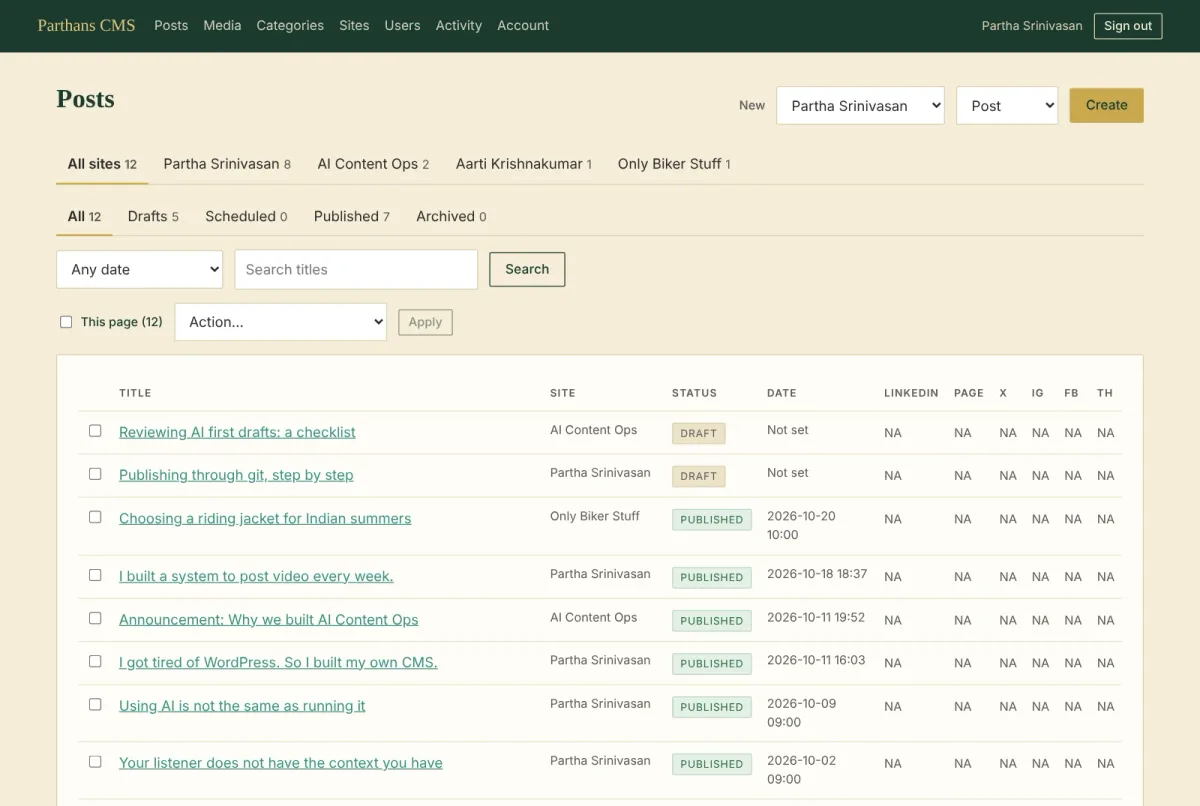
Each site has its own settings, its own theme folder and its own editors. I see everything. Anant sees AI Content Ops. Aarti sees her own site and nothing else.
Why plain files
WordPress builds every page on every visit. It runs PHP and MySQL around the clock to show the same article to the thousandth reader that it showed the first.
This CMS builds a page once, when I publish. After that, the web server hands over a finished file. There is no login page, plugin or database on the public site for anyone to attack, because there is nothing running there at all. If the admin is switched off, every blog keeps working.
The build is a pure function: the database plus the site's own header and footer go in, and files come out. The same inputs always produce the same bytes. That property turns out to matter a lot, and part 2 explains why.
Borrowing each site's header and footer
Each of my sites is hand-built HTML. I did not want a second copy of each menu inside the CMS that I would forget to update.
So at every build, the CMS opens the site's own index.html, takes the header and footer elements and the stylesheet links, and wraps every blog page in them. Change a menu on the main site, and the next publish picks it up. The blog's own styles sit in a small theme folder and load after the site's stylesheet, so the blog builds on the site's look rather than replacing it.
The parts that run on a timer
One process does everything. Inside it, a scheduler wakes every minute and:
publishes any post whose scheduled time has passed
sends social posts, once the page is actually live
checks the drafts inbox each morning at 10
runs the nightly jobs after 01:30 India time: an encrypted backup, session clean-up, token refreshes
There is no separate job runner and no queue service. For four personal blogs, a timer inside the app is enough. It does mean that restarting the app interrupts whatever the timer was doing, which is the story of part 5.
The rule that shaped everything else
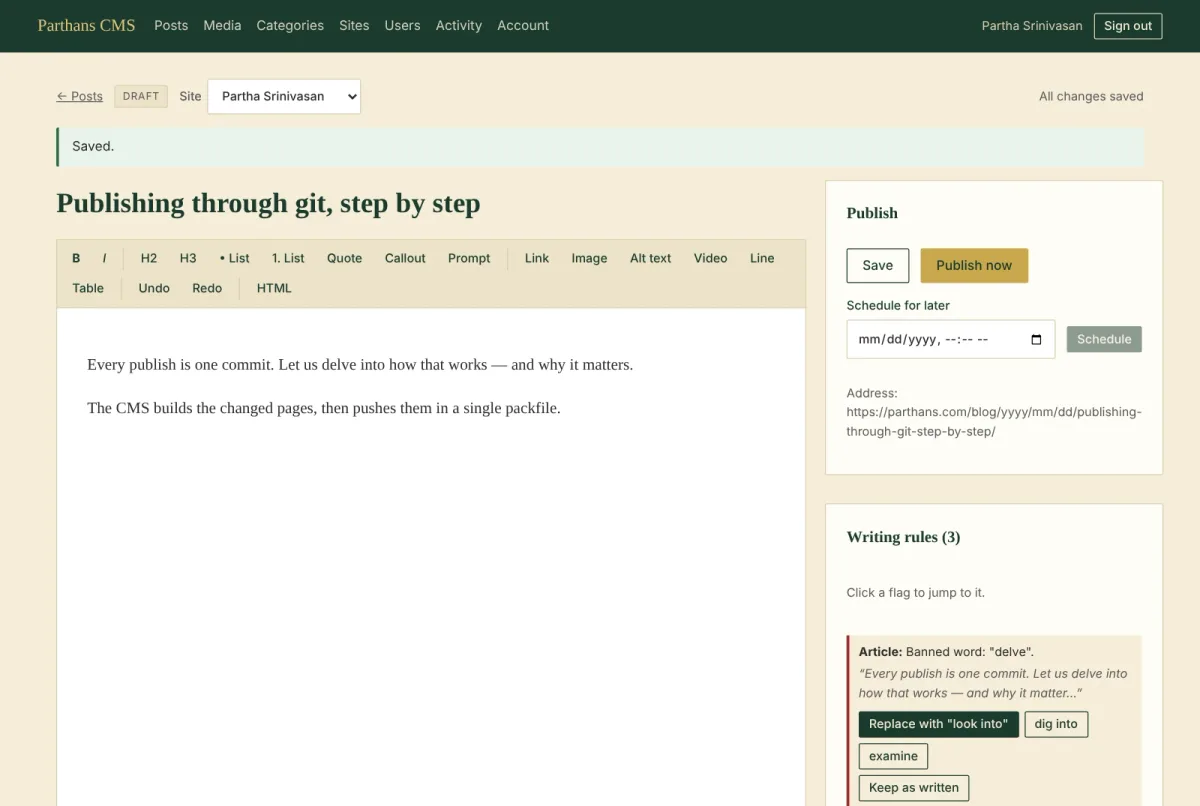
One line in the spec mattered more than the rest: it never publishes on its own. Only a signed-in person can publish or schedule a post. Scheduling counts as approving in advance. No automation, including any I build later, can publish.
That rule decided several designs that would otherwise look odd. Bulk actions on the Posts screen can move, archive or delete posts, but they cannot publish them. When I want Claude to draft a post in another session, it pushes a Markdown file to a private inbox repository, and the CMS turns it into a draft. Nothing that arrives through the inbox can be anything but a draft, whatever the file says. The only thing the CMS writes back to that repository is a list of existing posts, so a drafting session can avoid repeating one.
By the numbers
First commit: 10 October 2026
About 9,800 lines of JavaScript across the app and its logic
71 commits to date, each one a change I asked for and checked
69 automated tests, run before every change goes out
Next, part 2: how pressing Publish turns into a single git push, and why I stopped using GitHub's API to do it.