
This is part 3 of five on how my CMS works. Part 1 covered the architecture, part 2 publishing.
Static blogs have one big security advantage: there is almost nothing on them to attack. No login page, no database, no plugins. All of that risk moves to one place, the admin at cms.parthans.com. So the admin gets several independent layers. If one fails, the next still holds.
Layer 1: Cloudflare Access, before the login page
Nobody reaches the CMS login page without first passing Cloudflare Access. It sits in front of the whole admin and asks for an email address, then sends a one-time code to it. Only addresses on my list get a code. Everyone else never sees a single page the CMS serves.
This layer also caught me out. When I added Anant and Aarti to the list, neither could get in. Cloudflare showed them a page saying sign-in was restricted to members, and their attempts did not even appear in the logs.
The cause: the only sign-in method attached to the application was "Cloudflare", which means a Cloudflare account that is a member of mine. An address on the allow list still needed a way to sign in. The fix was to add the One-time PIN sign-in method to my Cloudflare account and attach it to the CMS application. After that, anyone on the list could get an emailed code.
Claude suggested that fix and advised against the quicker one, making them members of my Cloudflare account. That would have given them access to my DNS and every other setting there. One small setting, two very different amounts of trust.
Layer 2: password and authenticator, every time
Behind Cloudflare, every user signs in with a password and a six-digit code from an authenticator app. There is no way to switch the second step off.
Passwords are hashed with Argon2id, using OWASP's recommended settings. The CMS never stores a password it could read back.
Codes follow the standard every authenticator app uses (TOTP, RFC 6238). The CMS remembers the last code each person used, so a code cannot be replayed within its 30 seconds.
Five wrong passwords lock the account for 15 minutes. Twenty failures from one IP address in 15 minutes block that address.
A failed sign-in takes the same time whether the account exists or not, and the password reset form says the same thing either way. Neither can be used to find out who has an account.
A sign-in from a browser the CMS has not seen before sends that person an email, with a reminder that Sign out everywhere is on their account page.
Layer 3: sessions
After the password, a person gets a short-lived session that can do one thing: enter the code. After the code, that session is thrown away and a new one is issued. A cookie from the halfway point can never be replayed as a full sign-in.
The session cookie can only be sent over HTTPS, only to this site, and never to scripts. The database stores a hash of it, never the cookie itself, so a copy of the database contains no usable sessions. A session ends after two hours without use or twelve hours in total. A person can choose "keep me signed in on this computer" for 30 days, and every such session is listed on their account page with a button to end it.
Layer 4: every check on the server
Every page and every action checks, on the server, who is asking and which site the thing belongs to. Aarti can edit her own site. If she typed the address of one of my posts into the browser, the server would answer "not found".
API requests from the editor also have to come from the CMS's own address. A request sent from any other web page is refused. I found out how strictly when I ran a copy of the CMS on my own machine for the screenshots in this series:
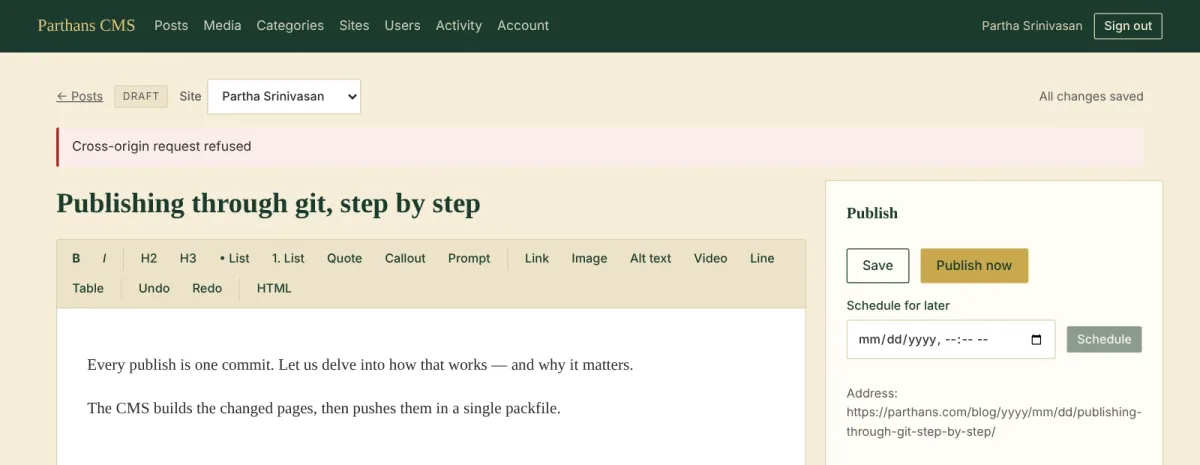
The copy was running at a local address the CMS had no reason to trust, so it refused my own save. That is the check working.
Layer 5: what goes onto public pages
Even a fully trusted editor, or an editor whose account has been stolen, should not be able to put code on a public page. So:
Post HTML is cleaned to an allowed list of tags and attributes when it is saved, and again when it is built.
Embedded video and other iframes are allowed only from each site's approved domains.
Every uploaded image is re-encoded, which strips anything hidden inside the file. SVG uploads are refused.
Secrets
API keys live in the server's environment, never in the code or the repository. Social media tokens are stored in the database encrypted with AES-256-GCM, using a key kept in the environment. A copy of the database on its own reveals no tokens. Backups are encrypted the same way before they leave the server.
Every key is also limited where it is issued. The GitHub token reaches only the repositories the CMS works with, and inside the drafts inbox the CMS writes one folder. The backup key for R2 reaches one bucket.
The audit trail
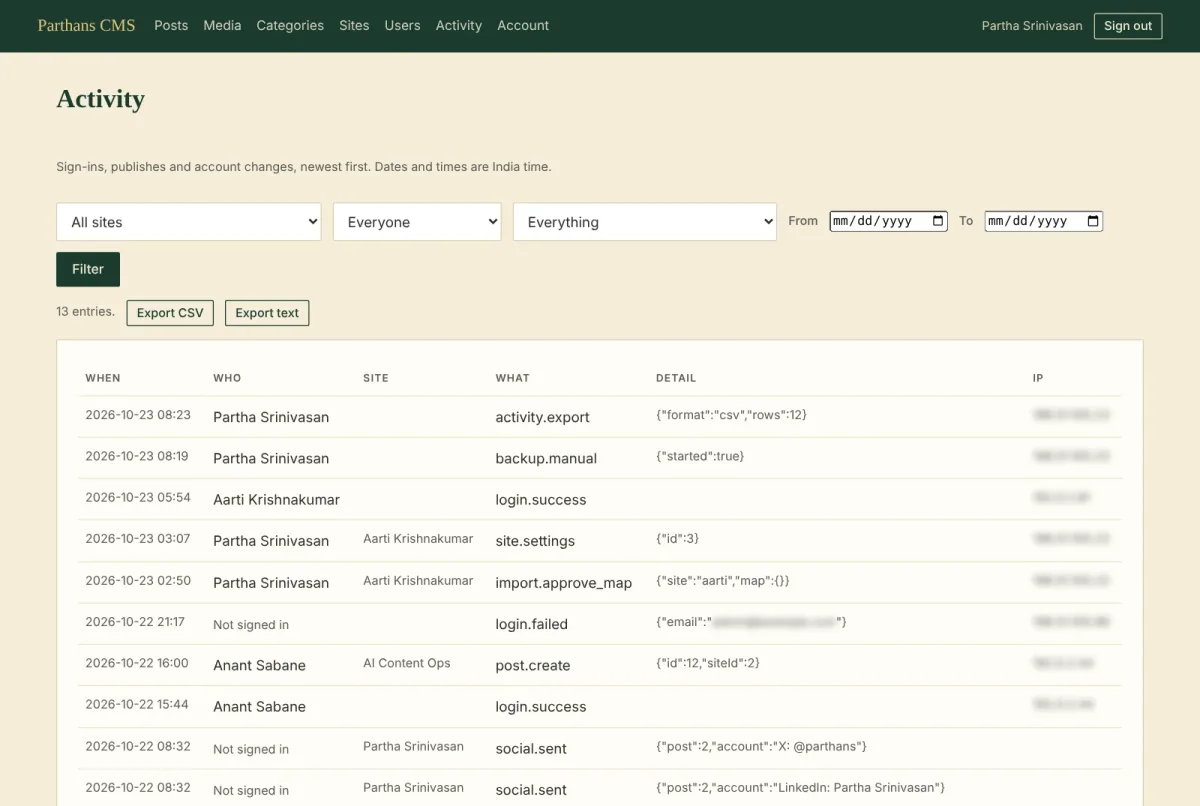
Sign-ins, publishes, settings changes and exports all go into an Activity log. I can filter it by site, by person, by kind of action and by date, and export what I filter to CSV or text.
What security cost me
Very little in day-to-day use. Signing in takes one emailed code and one authenticator code. A trusted computer stays signed in for a month.
The real cost was in testing. Every layer had to be checked on its own, and the Cloudflare lock-out showed why. Each piece was set up correctly. The combination still kept the right people out. The only way to find that was to have a real user try.
Next, part 4: moving thousands of posts out of WordPress, and the evening I found 2,228 blank drafts.