
This is the last of five parts on how my CMS works. Parts 1 to 4 covered the architecture, publishing, security and the move out of WordPress. This one is about living with it.
With WordPress, someone else ships the updates and I install them. With my own CMS, every update is mine, and so is every bad day. Here are the bad days so far, and what each one changed.
How a change goes live
The CMS lives in a private GitHub repository. Every change, whether I asked for it or Claude suggested it, goes through the same steps:
Claude makes the change and adds or updates a test for it.
The full test suite runs. There are 69 tests today.
The production build runs, to catch anything the tests miss.
Anything visible gets checked running: by Claude in a copy with sample data, and by me on the live system.
The change is pushed to GitHub, and FlyWP rebuilds and redeploys the CMS.
Step 5 is where most of my trouble has come from.
The deploy that hung
This week, one deploy stalled after "Pulling repository", was killed, and then refused to run again because it had "been attempted too many times".
Worse, two copies of the CMS were now running side by side, built from different versions of the code. Each page asked for script files by names that only one of the two copies had. Depending on which copy answered, the browser got the page from one build and a 400 error for its scripts from the other. Signing in failed with a 500 error.
Restarting Docker on the server cleared it, and I raised it with FlyWP's support. The practical lesson: when FlyWP says "Deploying", leave the CMS alone until it finishes. Watching that word flash up after every change is still the least comfortable part of owning this.
A rule I added after that: nothing deploys during a long job
The import and the backup both run inside the CMS process. A deploy replaces that process. So while an import or a backup is running, nothing gets pushed. Claude now asks before pushing whenever a long job might be running, and holds finished changes until I say go.
The restart at 10:55 pm
The rule came one night too late.
At 10:35 pm, Claude pushed the import fixes from part 4. At about 10:45 pm, I started Aarti's import and went to bed. In the morning the Sites page said the import had been interrupted because the CMS had restarted. The nightly backup had also failed.
My first guess was that the backup had caused the restart. It made sense. It was wrong, and three commands on the server showed it.
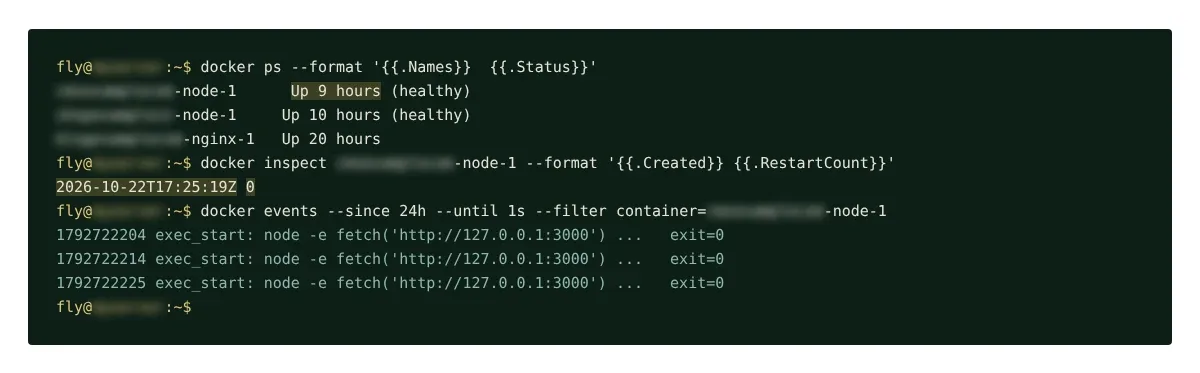
docker psshowed the CMS container "Up 9 hours" at 8 am. So it had started at around 11 pm, well before the backup at 1:30 am.docker inspectshowed the container was created at 17:25 UTC, 10:55 pm in India, and had zero restarts. A crash makes Docker restart the same container. A new container is what a deploy creates.docker eventsshowed nothing but FlyWP's health check, every ten seconds, all passing.
There was one more clue I already had: the email saying the backup failed. The CMS sends that email after the failure. If the backup had crashed it, there would have been no email.
So the deploy of the import fixes, still building when I started the import, finished at 10:55 pm and replaced the running CMS, import and all. The backup failed later, for a different reason.
Now, before I start anything long, I run one command to check that the latest deploy has finished:
docker inspect your-cms-container --format '{{.Created}}'
If the time is newer than my last push, the new version is live.
The backup that failed at 1:30 am
Every night after 1:30 am India time, the CMS backs itself up to a private Cloudflare R2 bucket:
the database, copied with SQLite's
VACUUM INTOso the copy is consistent even while the CMS is in useevery image not uploaded before, each recorded once it is safe, so no file is sent twice
everything compressed, then encrypted with AES-256-GCM before it leaves the server
That night the import had added thousands of new images. Somewhere in that batch, R2 answered one upload with a 502 error. The backup had no retry, so one bad answer stopped the whole run. The email quoted Cloudflare's entire HTML error page at me.
Now each upload gets four tries, with longer waits between them. A file that still fails is listed by name and the rest carry on. The email gives a short reason. Anything that did not upload is tried again the next night.
A button that did nothing, then a page that would not let go
Pressing Back up now used to run the whole backup inside that one click. With thousands of images, that took longer than the 100 seconds Cloudflare waits for an answer. The page just sat there. No message, no progress, and no way to tell whether anything was happening.
So the backup moved into the background, like the import: the button returns at once, a progress box shows what it is uploading and how far it has got, and only one backup can run at a time.
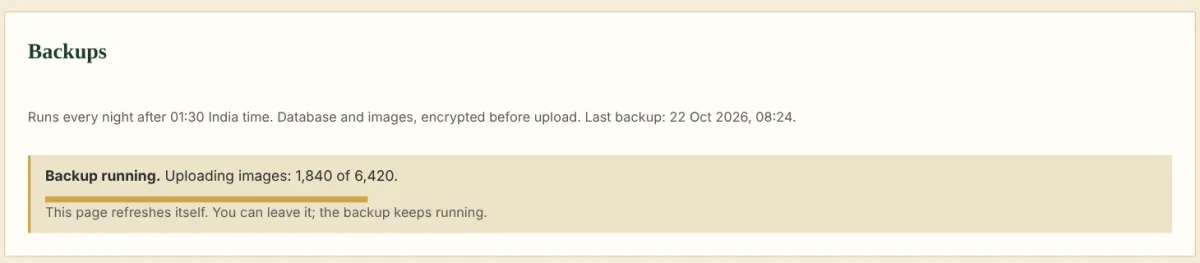
That fix had a bug of its own. The progress box told the browser to reload the page every five seconds. When I clicked to another screen, the browser still held that instruction and kept pulling me back to the backup page. Claude had written it. It replaced the reload with a refresh that runs only while the box is on screen, checked in a test browser that leaving the page now stays left, and pushed the fix.
The social posts that would not go
At 8:31 one morning I published "A two-minute test for your firm's positioning". Twenty minutes later, all four social posts, LinkedIn, X, Instagram and Threads, had failed with the same message: the page was not live after 20 minutes, so nothing was posted.
Claude's first explanation was that FlyWP had been busy deploying the CMS three times that morning, so the blog's own deploy had probably queued behind them. The timing fitted, and I accepted it. Claude raised the wait to two hours and added an email for every failure. Both changes were worth keeping. The explanation behind them was probably wrong.
I pressed Retry, and the posts sat at "pending". Claude's next suspect was the scheduler, the loop that sends social posts once a minute. Looking there, it found a real weakness: none of the calls to LinkedIn, X, Instagram, Threads, GitHub, R2 or the email service had a time limit, so a single connection that never answered could hold up every post behind it. That got fixed too. It was not the cause either.
I was at work and could not run commands on the server. So Claude changed the CMS to write the reason for waiting on the post itself. Five minutes after that went live, the post said:
Waiting for the page: the page could not be reached (ECONNREFUSED).
The page was live. Readers could open it. From inside my own server, the CMS's connection to parthans.com was being refused. That refusal very likely caused the morning failure as well. The theory about queued deploys fitted the timing, and nobody checked it.
The fix has two parts. When the connection is refused, the CMS looks the address up through public DNS and connects to what readers reach. If even that fails, it posts ten minutes after publishing and says on each post that it was sent without a page check. A page that answers "not found" still blocks. All four posts went out at 4:15 pm.
Why the server refuses its own site is still an open question. One command, the next time I am at the server, should answer it.
The lesson cost me most of a day: make the system say why it is waiting. Two plausible theories took hours. One line of text on the screen settled it in five minutes.
Deciding what it should not do
Not every change adds something. A week in, I asked for the CMS to post short videos to YouTube, Instagram, LinkedIn and X from a private storage bucket. Claude built it. A few days later I took it out. Video has far more moving parts than words and pictures: formats, lengths, processing, each platform's own rules. I would rather post video by hand, properly, than babysit another pipeline.
The CMS now handles written posts and images. That is enough.
What owning it has cost
In time, most of it went into the first two weeks. In money, very little: it runs on a server I already pay for.
The real cost is attention. When something goes wrong, there is no vendor forum and no plugin update. There is me, the logs and the code. Having the code written down, with tests and a running history of every change and why, is what makes that manageable. So does an AI that will read a log with me at 8 am.
That is the series. If you are thinking of doing the same, start with the spec. Everything else follows from it.