
Earlier this month I wrote about turning my old iPad into a control panel for my Mac. The code is public on GitHub as the-deck-by-parthans, and within a day it had drawn stars and a fork. The design choice I would point anyone reading that code to first is a short one: the iPad never sends a command.
When I tap a button, the iPad tells the Mac the name of the button. The Mac looks that name up in one settings file and decides what it means. If a button is not in that file, nothing happens. A web page that can open apps and type into them needs a limit like that, and this one is easy to check: read one file and you know everything the panel can do.
Looking back across my builds, the same kind of decision shaped each one: what the tool must never be able to do. Once that was written down, much of the rest of the design followed from it.
Three builds, three limits
The CMS never publishes on its own. That line in the spec mattered more than the rest and decided several designs, as I explained in part 1 of the CMS series. Only a signed-in person can publish or schedule. When I want Claude to draft a post in another session, it pushes a file to a private inbox, and whatever that file says, it arrives as a draft.
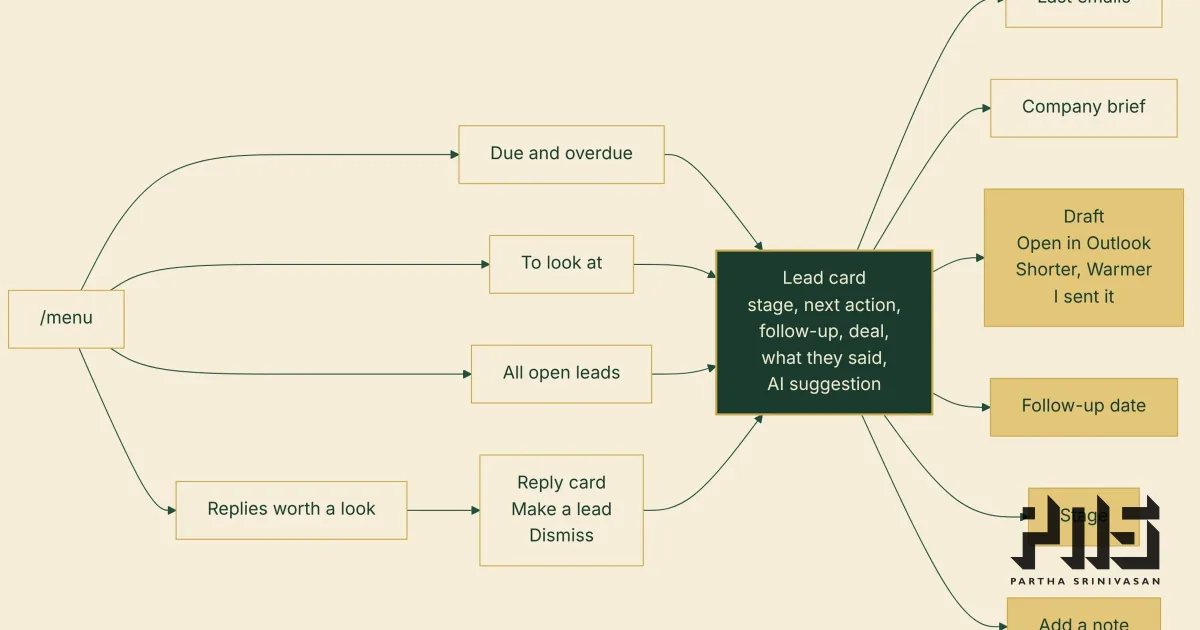
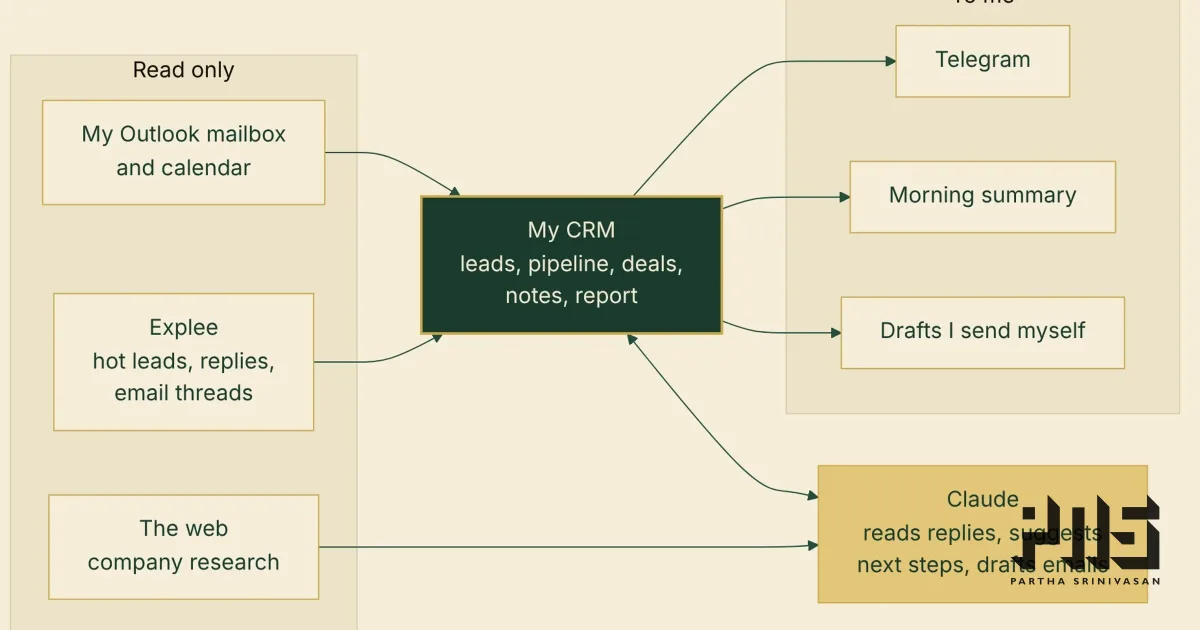
The CRM reads and never writes. Its access to my mailbox and calendar is read-only. That rule was tested on the second day of the build, as I wrote in the CRM post. I wanted follow-up emails placed in my Outlook Drafts folder, and Microsoft's permission for creating drafts also allows changing or deleting any mail. My code would only ever have created drafts, but I kept the mailbox read-only. The drafts stay in the CRM, and a button opens each one in Outlook for me to send.
The iPad only names buttons. The Mac decides what each name means, from one settings file.
Why it matters when AI writes the code
I build these tools with Claude. I set the requirements and make the calls, and Claude writes the code. An AI model will build whatever you describe, including features that quietly reach further than you intended. In the CMS, the rule was written into the spec before any code, which gave me something fixed to check each change against.
It also makes the trade-offs visible. Keeping the CRM's mailbox access read-only cost me the convenience of drafts appearing straight in Outlook. I accepted that because I had already decided what the tool must never do.
While I have not had a single "OH! SHIT!" moment (YET!??!?), I have enforced a common rule across all my builds and all chats linked to builds. NEVER push without my explicit command and my confirmation that I have read EVERY change being committed. This makes me more patient with myself, less lazy; because I need to confirm every fix, change, commit because it uses resources.
What this does not cover
A rule like this limits what a tool is allowed to do. Bugs, weak setup and plain mistakes need tests, reviews and attention on top of it. Building your own also means you own every fix, at whatever hour it is needed. If you would rather not carry that, a well-run product someone else maintains is often the better choice.
Pick one tool you rely on at work. Could you write down, in one sentence, what it must never be able to do?
Teams bringing AI into their own work face the same question of limits, and it is part of what we train for at AI Content Ops.